To make a Post Summary Correction (PSC) for other broker's entry, follow the steps below:
Step 1: Open the Entry
•Open the entry in the system.
•Navigate to the Post Summary Correction screen.
Step 2: Enable PSC
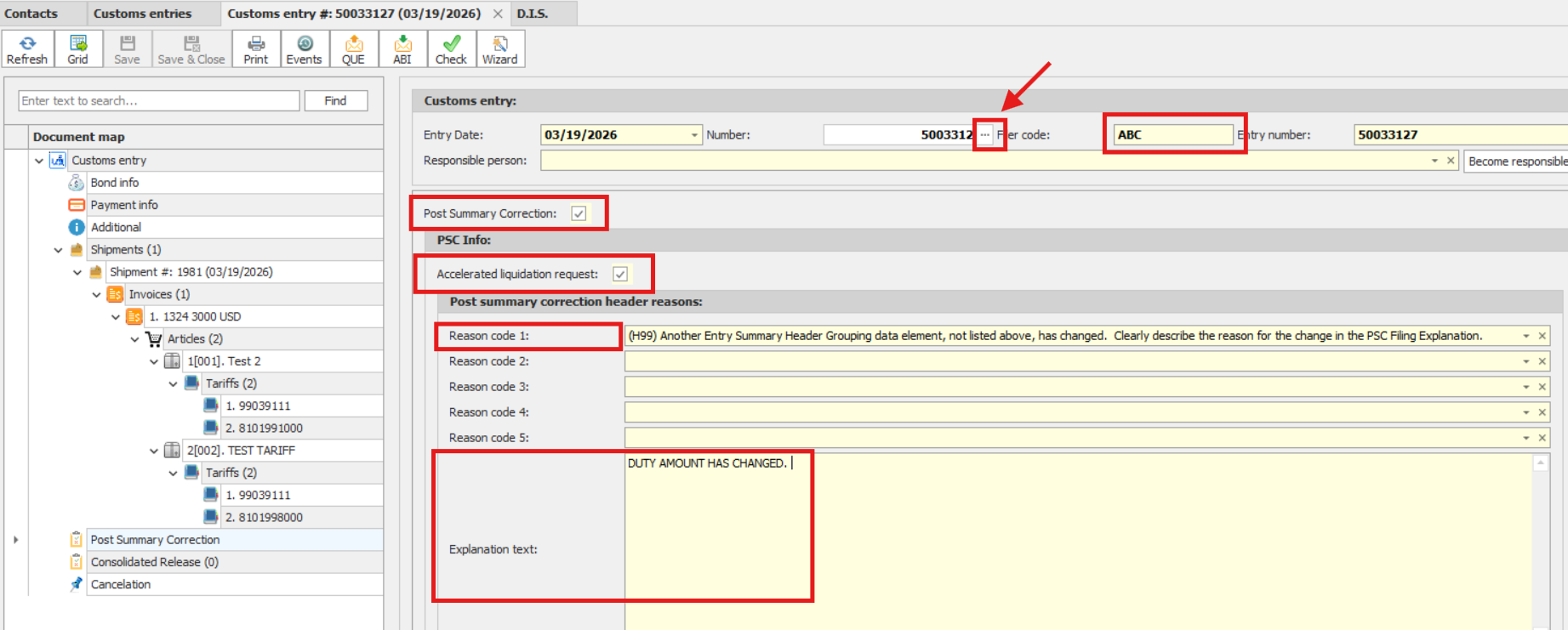
•Check the box labeled “Post Summary Correction.”
•Select the appropriate reason code(s).
•Enter a clear explanation describing the correction.
Step 3: input entry #
• Go to the customs entry header
•Change the filer code to other broker's filer code
•Then change the entry number.
Step 4: Update Article Information
•Go to the Article Screen for the item you are correcting.
•Open the PSC tab.
•Select the reason code that reflects the change made for that specific item.
Step 5: Save and Submit
•Save all changes.
•QUE the Entry Summary Replace.